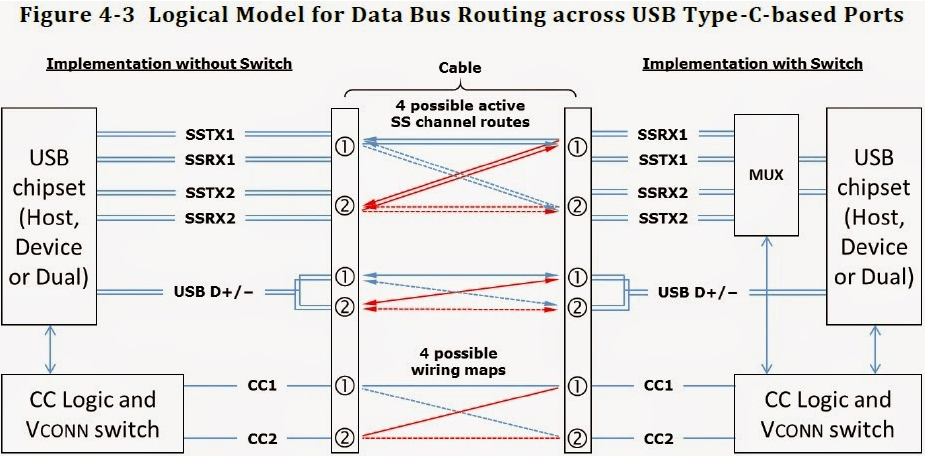
Since Type-C supports reversible insertion, the CC pin is used to detect orientation. From the DFP’s perspective, when CC1 is pulled down, it indicates correct insertion; if CC2 is pulled down, it indicates reverse insertion. After detecting orientation, corresponding USB signals are output—for example, CC1 corresponds to SSTX1 and SSRX1. The right side of the diagram integrates a MUX. Since USB 3.1 data rates reach up to 10 Gbps, to avoid PCB trace branching, the MUX switches signals based on orientation: – Rectangular insertion: Switches to SSRX1 & SSTX1 – Square insertion: Switches to SSRX2 & SSTX2
- High-Performance Waterproof Solar Connectors
- Durable IP68 Waterproof Solar Connectors for Outdoor Use
- High-Quality Tinned Copper Material for Durability
- High-Quality Tinned Copper Material for Long Service Life
- Y Branch Parallel Solar Connector for Enhanced Power
- 10AWG Tinned Copper Solar Battery Cables
- NEMA 5-15P to Powercon Extension Cable Overview
- Dual Port USB 3.0 Adapter for Optimal Speed
- 4-Pin XLR Connector: Reliable Audio Transmission
- 4mm Banana to 2mm Pin Connector: Your Audio Solution
- 12GB/s Mini SAS to U.2 NVMe Cable for Fast Data Transfer
- CAB-STK-E Stacking Cable: 40Gbps Performance
- High-Performance CAB-STK-E Stacking Cable Explained
- Best 10M OS2 LC to LC Fiber Patch Cable for Data Centers
- Mini SAS HD Cable: Boost Data Transfer at 12 Gbps
- Multi Rate SFP+: Enhance Your Network Speed
- Best 6.35mm to MIDI Din Cable for Clear Sound
- 15 Pin SATA Power Splitter: Solutions for Your Device Needs
- 9-Pin S-Video Cable: Enhance Your Viewing Experience
- USB 9-Pin to Standard USB 2.0 Adapter: Easy Connection
- 3 Pin to 4 Pin Fan Adapter: Optimize Your PC Cooling
- S-Video to RCA Cable: High-Definition Connections Made Easy
- 6.35mm TS Extension Cable: High-Quality Sound Solution
- BlackBerry Curve 9360: Key Features and Specs





















Leave a comment