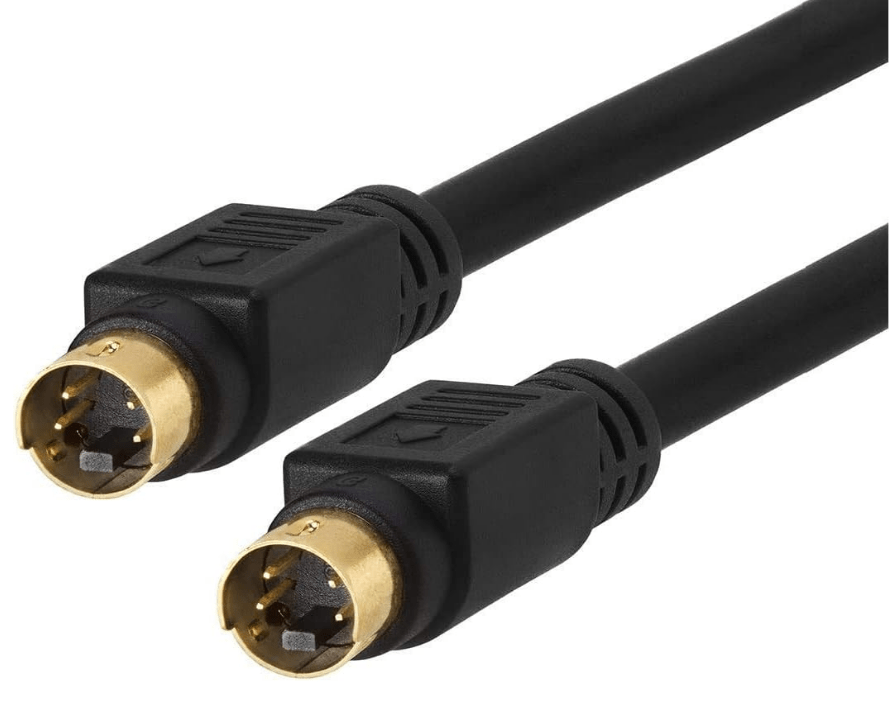
S-Video, short for “Separated Video,” is an analog video interface that improves on composite video by transmitting luminance (brightness) and chrominance (color) signals separately. This separation reduces signal interference, resulting in sharper, clearer images compared to composite video. Though widely used in the late 20th century, it has been largely superseded by digital standards in modern electronics.
1. Core Principle: Signal Separation
Unlike composite video (which merges brightness and color into a single signal), S-Video splits the video signal into two distinct channels:
- Luminance (Y): Carries brightness information, including details like edges and contrast.
- Chrominance (C): Transmits color data, including hue and saturation.
By keeping these signals separate, S-Video avoids “cross-talk” (interference between brightness and color), reducing issues like color bleeding, blurriness, or washed-out details common in composite video.
2. Physical Connector and Cable Design
- Connector Type:
- Uses a 4-pin mini-DIN connector (small, circular with 4 pins) or, less commonly, a 7-pin variant (with additional pins for audio, though rare).
- The 4-pin design is standard, with pins dedicated to luminance (Y), chrominance (C), ground, and a shield.
- Cable Construction:
- Shielded cables with two separate conductors (one for Y, one for C) to maintain signal separation.
- Maximum reliable length is ~10 meters; longer cables may introduce noise or signal degradation.
3. Performance and Limitations
- Image Quality:
- Supports standard definition (SD) resolutions: up to 480i (NTSC, North America) or 576i (PAL, Europe/Asia).
- Produces sharper edges and more accurate colors than composite video but falls short of component video (which supports higher resolutions) or digital formats like HDMI.
- Audio Handling:
- S-Video does not carry audio signals—it is strictly a video interface. Audio must be transmitted separately via RCA cables (left/right stereo), identical to composite audio setups.
4. Common Applications
- Consumer Electronics (1990s–2000s):
- Connecting devices like DVD players, VCRs, gaming consoles (e.g., PlayStation 2, Nintendo GameCube), and camcorders to TVs.
- Used in home theater systems as a mid-tier upgrade from composite video, before component video and HDMI became prevalent.
- Retro Gaming:
- Still valued by enthusiasts for connecting vintage consoles (e.g., Sega Saturn, Sony PlayStation) to CRT TVs or modern displays via adapters, as it preserves better image quality than composite.
5. Comparison with Other Video Interfaces
| Interface | S-Video | Composite Video | Component Video | HDMI (Digital) |
|---|---|---|---|---|
| Signal Split | Luminance (Y) + Chrominance (C) | Merged Y + C | Y (luminance) + Pb/Pr (color difference) | Digital (uncompressed video + audio) |
| Max Resolution | 480i/576i (SD) | 480i/576i (SD) | Up to 1080i (HD) | Up to 8K (HD/4K/8K) |
| Audio Support | None (requires separate RCA) | None (requires separate RCA) | None (requires separate RCA) | Multi-channel audio (e.g., 5.1, Atmos) |
| Connector | 4-pin mini-DIN | Yellow RCA | 3 RCA (Y/Pb/Pr) | HDMI Type-A/C |
| Image Quality | Better than composite | Basic (prone to interference) | Better than S-Video (HD-capable) | Superior (no analog loss) |
6. Decline and Legacy
- Replacement by Digital Standards:
- HDMI (introduced in 2002) and DVI rendered S-Video obsolete by offering higher resolutions (HD, 4K), digital audio, and simplified single-cable setups.
- Component video, which supports HD resolutions (1080i), also outperformed S-Video in the analog era.
- Current Niche Uses:
- Retro gaming: Connecting classic consoles (e.g., Nintendo 64, Sega Dreamcast) to CRT TVs or modern displays via S-Video-to-HDMI converters.
- Legacy equipment: Some older DVD players, surveillance cameras, or industrial monitors still use S-Video for compatibility.
7. Advantages and Disadvantages
- Advantages:
- Improved Image Quality: Sharper than composite video due to separated Y and C signals, with reduced color bleeding.
- Simplicity: Easier to set up than component video (fewer cables) while offering better quality than composite.
- Widespread Compatibility: Supported by most TVs, VCRs, and gaming consoles from the 1990s to early 2000s.
- Disadvantages:
- No HD Support: Limited to standard definition (480i/576i), making it unsuitable for modern high-definition content.
- No Audio: Requires separate RCA cables for sound, cluttering setups compared to HDMI (which combines audio/video).
- Analog Limitations: Susceptible to noise and signal loss over longer cables, unlike digital interfaces.
Conclusion
S-Video represented a significant step forward in analog video quality, addressing the flaws of composite video through signal separation. It dominated mid-tier home entertainment setups for decades, offering a balance of simplicity and clarity. While obsolete in modern devices, its legacy endures in retro tech communities, where it remains a preferred interface for preserving the integrity of classic gaming and video content.terfaces like SATA and USB in mainstream use, it remains relevant in legacy industrial and retro computing setups.





















Leave a comment