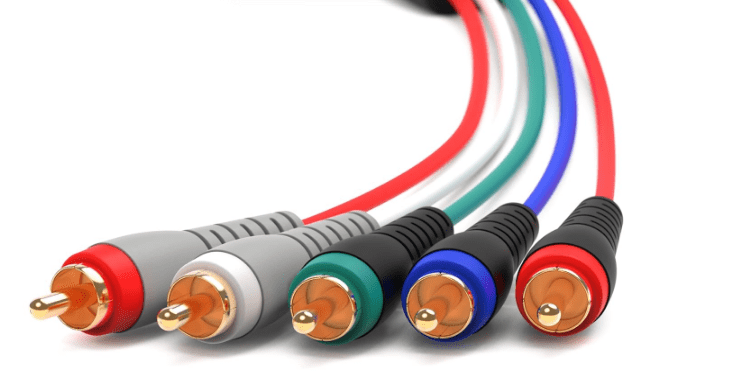
Component Video is an analog video interface that further improves on S-Video and composite video by separating video signals into three distinct channels: luminance (brightness) and two color-difference signals. This separation minimizes interference, enabling higher image quality and support for high-definition (HD) resolutions, making it a staple of home entertainment systems before the rise of digital interfaces.
1. Core Principle: Three-Signal Separation
Unlike composite video (merged brightness + color) or S-Video (separate brightness + combined color), Component Video splits the video signal into three discrete channels:
- Luminance (Y): Carries brightness information, including details, contrast, and black/white tones.
- Color-Difference Signals:
- Pb (or Cb): Represents the difference between blue and luminance (blue minus brightness).
- Pr (or Cr): Represents the difference between red and luminance (red minus brightness).
By isolating these signals, Component Video eliminates “cross-talk” between brightness and color, resulting in sharper edges, more accurate colors, and reduced distortion compared to older analog interfaces.
2. Connector and Cable Design
- RCA Connectors:
- All three signals use standard RCA plugs, with color coding to avoid confusion:
- Y (luminance): Typically green.
- Pb/Cb (blue difference): Usually blue.
- Pr/Cr (red difference): Typically red.
- Note: These are video-only connectors—audio requires separate RCA cables (left/right stereo, often white/red).
- All three signals use standard RCA plugs, with color coding to avoid confusion:
- Cable Specifications:
- Shielded cables are recommended to reduce electromagnetic interference (EMI), especially over longer distances.
- Maximum reliable length is ~10 meters for standard use; high-quality cables may support up to 15 meters without significant signal loss.
3. Resolution and Performance
- Supported Resolutions:
- Standard Definition (SD): 480i (NTSC) and 576i (PAL).
- High Definition (HD): Up to 1080i (interlaced) and 720p (progressive scan), making it one of the first analog interfaces to support HD content.
- Limitation: Does not support 1080p (full HD) in most consumer implementations, as this became standard with digital HDMI.
- Image Quality:
- Superior to composite and S-Video, with vibrant colors, sharp details, and minimal color bleeding—critical for HD content like Blu-rays, HDTV broadcasts, and gaming consoles (e.g., PlayStation 3, Xbox 360).
4. Usage and Compatibility
- Common Devices with Component Video Outputs:
- DVD players, Blu-ray players, HD set-top boxes, gaming consoles (PS2, PS3, Xbox, Xbox 360), and older HDTVs.
- Devices with Component Video Inputs:
- CRT HDTVs, rear-projection TVs, and early flat-screen LCD/Plasma TVs (before HDMI dominance).
- Audio Pairing:
- Component Video carries only video, so audio requires separate stereo (2-channel) or surround sound cables (e.g., RCA, optical TOSLINK, or coaxial digital).
5. Comparison with Other Video Interfaces
| Interface | Component Video | S-Video | Composite Video | HDMI (Digital) |
|---|---|---|---|---|
| Signal Split | Y (luminance) + Pb + Pr | Y (luminance) + C (color) | Merged Y + C | Digital (uncompressed video + audio) |
| Max Resolution | Up to 1080i/720p (HD) | 480i/576i (SD) | 480i/576i (SD) | Up to 8K (HD/4K/8K) |
| Connectors | 3 RCA (Y/Green, Pb/Blue, Pr/Red) | 4-pin mini-DIN | 1 RCA (yellow) | HDMI Type-A/C |
| Audio Support | None (requires separate cables) | None (requires separate cables) | None (requires separate cables) | Multi-channel audio (e.g., 5.1, Atmos) |
| Image Quality | Best analog (sharp, accurate colors) | Better than composite | Basic (prone to interference) | Superior (no analog loss) |
6. Applications and Historical Role
- Home Theaters (2000s–2010s):
- Primary interface for connecting DVD/Blu-ray players, HD cable boxes, and gaming consoles to HDTVs, before HDMI became ubiquitous.
- Preferred by enthusiasts for its ability to transmit 720p/1080i content with minimal quality loss.
- Professional Settings:
- Used in broadcast equipment, video editing suites, and live events for its reliable analog performance and HD support.
7. Decline and Legacy
- Replacement by Digital Standards:
- HDMI (introduced 2002) gradually replaced Component Video by offering:
- Higher resolutions (1080p, 4K, 8K).
- Uncompressed digital signals (no analog degradation).
- Integration of audio, video, and device control in a single cable.
- By the 2010s, most TVs and peripherals phased out Component Video inputs in favor of HDMI.
- HDMI (introduced 2002) gradually replaced Component Video by offering:
- Current Niche Uses:
- Connecting legacy HD devices (e.g., Xbox 360, PS3) to modern TVs via Component-to-HDMI converters.
- Retro gaming communities using older consoles (e.g., Wii, PS2) that output HD signals via Component Video.
8. Advantages and Disadvantages
- Advantages:
- Superior Analog Quality: Sharpest image among analog interfaces, with accurate colors and support for HD.
- Flexibility: Works with both SD and HD content, making it backward-compatible with older devices.
- Reliability: Less prone to interference than composite or S-Video, even over longer cable runs.
- Disadvantages:
- Cable Clutter: Requires 3 video cables + separate audio cables, unlike HDMI’s single-cable solution.
- No 1080p Support: Limited to 1080i/720p, insufficient for modern full HD content.
- Analog Limitations: Susceptible to signal loss over very long distances, unlike digital HDMI.
Conclusion
Component Video was a breakthrough in analog video technology, enabling high-definition content and setting a new standard for image quality in home entertainment. While HDMI’s digital advantages (higher resolutions, integrated audio) have made it obsolete in modern devices, Component Video remains a key part of video history—valued by retro tech enthusiasts and a testament to the evolution of display technology from analog to digital.





















Leave a comment