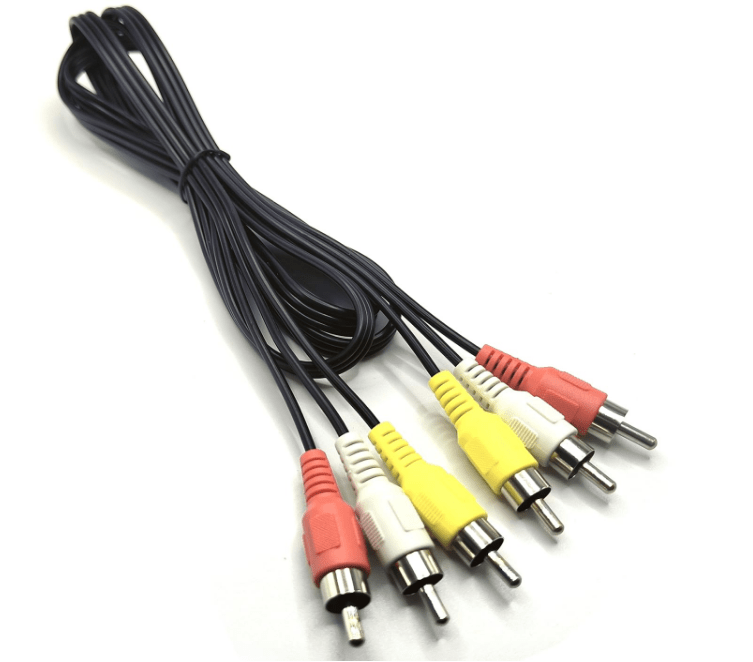
Composite Audio/Video (often shortened to “composite AV”) is a traditional analog interface used to transmit both audio and video signals through separate cables, commonly found in older consumer electronics. It was widely adopted for its simplicity but has been largely replaced by digital standards in modern devices.
1. Core Components: Audio + Video
Composite AV combines two types of signals, transmitted via distinct cables and connectors:
- Composite Video:
- A single cable carries all video information (luminance/brightness and chrominance/color) merged into one signal.
- Uses an RCA connector (typically yellow) to distinguish it from audio cables.
- Signal quality is limited by merging brightness and color data, which can cause “color bleeding” or blurriness in images.
- Composite Audio:
- Transmitted via two separate RCA cables for stereo sound:
- Left audio: Usually white or black.
- Right audio: Typically red.
- Carries analog audio signals, with no support for surround sound—limited to 2-channel stereo.
- Transmitted via two separate RCA cables for stereo sound:
2. Connector and Cable Design
- RCA Connectors:
- All three cables (video + left/right audio) use standard RCA plugs: cylindrical metal connectors with a central pin (for signal) and outer sleeve (for ground).
- Plugs are color-coded for easy identification: yellow (video), red (right audio), white/black (left audio).
- Cable Construction:
- Video cables are often coaxial (with a shield to reduce interference), while audio cables may be unshielded or lightly shielded.
- Maximum reliable length is ~5 meters; longer cables can introduce noise or signal degradation.
3. How Composite AV Works
- Video Transmission:
- Luminance (Y) and chrominance (C) signals are combined into a single waveform. This merging simplifies cabling but reduces quality—since the two signals share bandwidth, fine details (e.g., sharp edges) can be lost.
- Resolutions supported are limited to standard definition (SD): up to 480i (NTSC, used in North America) or 576i (PAL, used in Europe/Asia).
- Audio Transmission:
- Stereo audio is split into left and right channels, each carried on its own cable. No advanced features (e.g., Dolby Surround) are supported—only basic 2-channel sound.
4. Common Use Cases (Historical and Niche)
- Legacy Devices:
- DVD players, VCRs, older gaming consoles (e.g., PlayStation 2, Nintendo Wii), and CRT TVs (2000s and earlier).
- Camcorders, set-top boxes, and home theater systems from the pre-HD era.
- Niche Modern Uses:
- Connecting vintage gaming consoles to modern TVs (via composite-to-HDMI adapters).
- Budget-friendly setups where high-definition isn’t required (e.g., small TVs in waiting rooms).
5. Limitations and Drawbacks
- Video Quality:
- Merged luminance and chrominance signals lead to lower resolution (max 480i/576i) and artifacts like color distortion or blurriness, especially on larger screens.
- Not suitable for high-definition (HD) content (720p/1080p) or 4K.
- Audio Restrictions:
- Only 2-channel stereo; no support for 5.1 surround sound or advanced audio formats (e.g., Dolby Atmos).
- Susceptibility to Noise:
- Analog signals are prone to interference from nearby electronics (e.g., power cables), causing static in audio or “snow” in video.
6. Comparison with Other AV Interfaces
| Interface | Composite AV | S-Video | Component Video | HDMI (Digital) |
|---|---|---|---|---|
| Video Signals | Merged (luminance + color) | Separated (luminance + color) | Separated (Y/Pb/Pr) | Digital (uncompressed) |
| Max Resolution | 480i/576i (SD) | 480i/576i (SD) | 1080i (HD) | 8K (with audio/CEC) |
| Audio Support | 2-channel stereo | Requires separate audio | Requires separate audio | Up to 32-channel surround |
| Cables | 3 (yellow + red/white) | 1 (S-Video) + 2 audio | 3 (Y/Pb/Pr) + 2 audio | 1 (all signals) |
7. Decline and Legacy
- Replacement by Digital Standards:
- HDMI (introduced 2002) replaced composite AV by carrying high-definition video, multi-channel audio, and data (e.g., device control) over a single cable.
- Even analog alternatives like component video (supporting HD) offered better quality than composite.
- Current Niche Uses:
- Connecting vintage electronics (e.g., retro gaming consoles) to modern TVs via composite-to-HDMI converters.
- Low-cost setups in regions with limited access to digital devices.
8. Pros and Cons
- Advantages:
- Simplicity: Easy to set up with color-coded cables.
- Compatibility: Works with nearly all older TVs and peripherals.
- Low cost: RCA cables and connectors are inexpensive to produce.
- Disadvantages:
- Poor video quality: Merged signals cause artifacts and limit resolution to SD.
- No HD or surround sound support.
- Susceptibility to interference over longer distances.
Conclusion
Composite Audio/Video was a staple of home entertainment for decades, valued for its simplicity and universal compatibility. While its analog limitations (low resolution, stereo-only audio) make it obsolete for modern HD/4K devices, it remains a nostalgic and functional interface for retro tech enthusiasts. Its decline underscores the shift toward digital standards that prioritize higher quality and versatility, but its legacy lives on in the design of more advanced AV systems.





















Leave a comment