1. Definition and Historical Context
The AT Keyboard, also known as the “IBM AT Keyboard,” is a standard keyboard interface developed by IBM for its PC/AT (Advanced Technology) computers in 1984. It replaced the earlier PC/XT keyboard interface, introducing a more reliable and standardized connection for personal computers of the era.
2. Physical Connector and Design
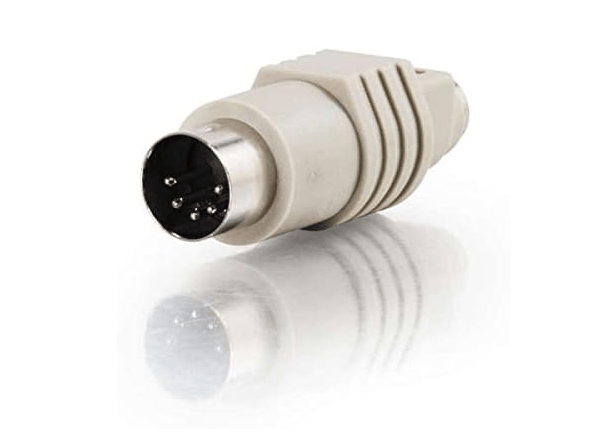
- 5-Pin DIN Connector:
- A circular, 5-pin connector (DIN 5-pin) with a diameter of ~13 mm, often referred to as the “AT connector.”
- The connector is keyed to prevent incorrect insertion, with pins arranged in a circular pattern.
- Cable Characteristics:
- Shielded cable to reduce electromagnetic interference, typically 1.5–2 meters in length.
3. Electrical and Protocol Specifications
- Signal Configuration:
- Pins include +5V power, ground, data, clock, and a reserved pin (unused in most implementations).
- Communication Protocol:
- Uses a serial, synchronous protocol with a data rate of ~33.3 Kbps (10 characters per second), sending 11-bit packets (start bit, 8 data bits, parity bit, stop bit).
- Keyboard Layout:
- Introduced the 101-key layout (with function keys, arrow keys, and numeric keypad), which became the standard for modern keyboards.
4. Comparison with Previous and Subsequent Interfaces
| Interface | AT Keyboard (1984) | PC/XT Keyboard (1981) | PS/2 (1987) | USB (1996) |
|---|---|---|---|---|
| Connector | 5-pin DIN | 5-pin DIN (non-keyed) | 6-pin mini-DIN | Type-A |
| Data Rate | ~33.3 Kbps | ~10 Kbps | ~10–100 Kbps | Up to 10 Gbps |
| Hot-Plug | No | No | No | Yes |
| Widely Used Until | Mid-1990s | 1984 | Late 2000s | Present |
5. Advantages Over PC/XT Keyboard
- Reliability:
- Keyed connector reduced damage from incorrect insertion, unlike the PC/XT’s non-keyed design.
- Faster Data Transfer:
- 33.3 Kbps vs. PC/XT’s ~10 Kbps, enabling faster key presses and more responsive typing.
- Standardized Layout:
- 101-key layout with dedicated function and arrow keys, improving ergonomics and productivity.
6. Limitations and Decline
- Lack of Hot-Plug Support:
- Required powering off the computer before connecting or disconnecting the keyboard, risking damage to the interface.
- Single Device Support:
- Could only connect a keyboard, unlike later PS/2 ports that supported mice as well.
- Obsoleteness:
- Replaced by PS/2 in 1987 (with smaller connectors and support for mice) and USB in the late 1990s (with plug-and-play and higher speeds).
7. Modern Relevance and Adaptation
- Vintage Computing:
- Essential for restoring classic IBM PCs, Compaq systems, and other 1980s/1990s computers.
- Retro Gaming:
- Some vintage gaming setups use AT keyboards for authenticity with old DOS games.
- Adapters:
- AT-to-PS/2 adapters allow using AT keyboards on newer systems, though hot-plugging remains unsupported.
- Collector’s Items:
- Vintage AT keyboards (e.g., IBM Model M) are sought after by enthusiasts for their mechanical switches and build quality.
8. Technical Legacy
- Layout Standardization:
- The 101-key layout introduced by the AT keyboard became the basis for modern keyboards, with minor variations (e.g., Windows keys) added later.
- Interface Evolution:
- Paved the way for PS/2 and USB by demonstrating the need for standardized, reliable keyboard interfaces in personal computing.
Conclusion
The AT Keyboard was a pivotal development in personal computer peripherals, standardizing the keyboard layout and interface for the IBM PC/AT and compatible systems. Though obsolete in modern computing, its legacy lives on in vintage hardware communities and as a testament to the evolution of computer input devices. The 101-key layout it introduced remains the foundation of today’s keyboards, highlighting its enduring impact on user experience design.


















Leave a comment