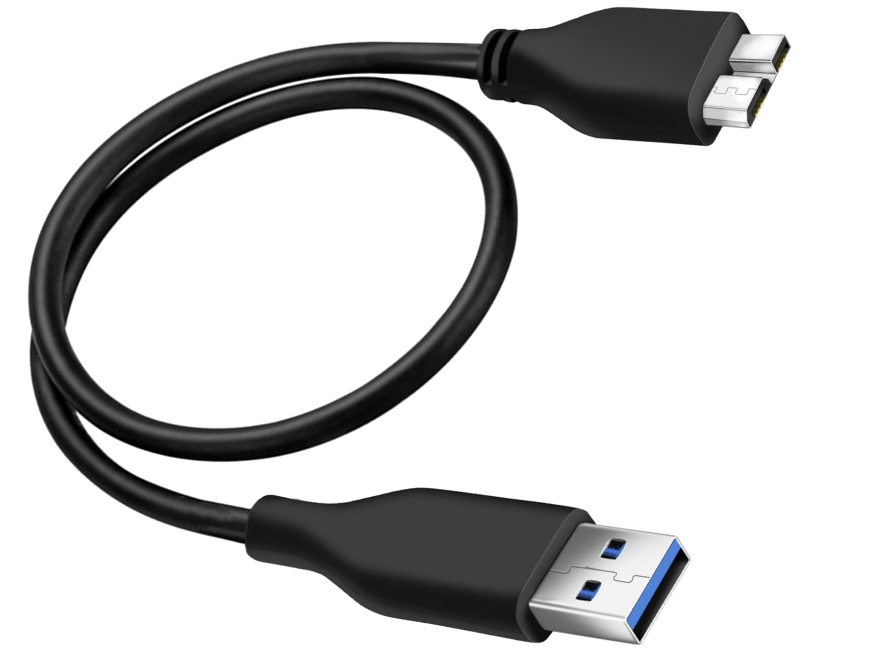
1. Definition and Development
- USB 3.0 (officially named “USB 3.1 Gen 1” since 2013) is a universal serial bus (USB) standard designed to replace USB 2.0, offering significantly faster data transfer rates and improved power management.
- Release: First introduced in 2008 by the USB Implementers Forum (USB-IF), it became the mainstream high-speed interface for computers and peripherals in the 2010s.
2. Physical Characteristics of USB 3.0 Ports and Connectors
- Port Design:
- USB Type-A (A3.0):
- Externally similar to USB 2.0 Type-A, but often colored blue inside the port for easy identification.
- Internally, it has 9 pins (vs. 4 pins in USB 2.0), with additional pins for high-speed data transmission.
- Other Connectors:
- USB Type-B, Micro-B, and Mini-B for specific devices (e.g., printers, external hard drives), also updated for USB 3.0.
- USB Type-A (A3.0):
- Cable Construction:
- USB 3.0 cables include extra wires for high-speed signals, making them slightly thicker than USB 2.0 cables.
3. Technical Specifications and Performance
- Data Transfer Rates:
- SuperSpeed mode: Up to 5 Gbps (625 MB/s), ~10 times faster than USB 2.0 (480 Mbps).
- Backward compatible with USB 2.0/1.1 devices, but speeds will be limited to the device’s maximum capability.
- Power Delivery:
- Provides up to 900 mA at 5V (vs. 500 mA in USB 2.0), enabling faster charging for compatible devices (e.g., smartphones, tablets).
- Dual-Channel Architecture:
- USB 3.0 uses separate channels for sending and receiving data (full-duplex), unlike USB 2.0’s half-duplex single channel.
4. Comparison with Previous USB Versions and Alternatives
| Feature | USB 2.0 | USB 3.0 (USB 3.1 Gen 1) | USB 3.2 Gen 2 (10 Gbps) | Thunderbolt 4 |
|---|---|---|---|---|
| Max Speed | 480 Mbps (60 MB/s) | 5 Gbps (625 MB/s) | 10 Gbps (1250 MB/s) | 40 Gbps |
| Power Delivery | 500 mA @ 5V | 900 mA @ 5V | 900 mA @ 5V (up to 3A with PD) | Up to 100W |
| Connector Types | Type-A, B, Micro-B | Same as USB 2.0 + Type-C | Type-C (primarily) | Type-C |
| Use Cases | Legacy devices | External storage, printers | High-speed docks, gaming | High-performance PCs |
5. Key Improvements Over USB 2.0
- Faster Data Transfers:
- Ideal for transferring large files (e.g., 4K videos, virtual machine images) or using high-bandwidth devices like external SSDs.
- Improved Power Efficiency:
- “Sleep mode” and better power management reduce energy consumption when devices are idle.
- Increased Device Support:
- Can handle more power-hungry devices (e.g., multiple external hard drives without a separate power adapter).
6. Applications and Modern Relevance
- Common Uses:
- External Storage: USB 3.0 flash drives, HDDs, and SSDs (e.g., transferring files between computers).
- Peripherals: High-resolution webcams, gaming controllers, multi-port hubs.
- Charging: Fast charging for smartphones and tablets (when combined with USB Power Delivery, PD).
- Current Status:
- While superseded by USB 3.2 Gen 2 (10 Gbps) and USB4 (up to 40 Gbps) in modern devices, USB 3.0 remains widely available in mid-range computers, laptops, and budget peripherals due to its cost-effectiveness.
7. Compatibility and Troubleshooting
- Backward Compatibility:
- USB 3.0 ports can connect to USB 2.0/1.1 devices, and USB 3.0 devices can plug into USB 2.0 ports (at reduced speeds).
- Tips for Optimal Performance:
- Use genuine USB 3.0 cables (blue connectors) for maximum speed.
- Ensure the motherboard, port, and device all support USB 3.0 to achieve 5 Gbps.
- Common Issues:
- Slow transfer speeds: Check if the port, cable, or device is USB 3.0-compatible.
- Device not recognized: Update USB controller drivers or try a different port/cable.
8. Evolution to Newer USB Standards
- USB 3.1 Gen 2 (10 Gbps, now called USB 3.2 Gen 2) and USB4 (up to 40 Gbps) offer faster speeds and better integration with Thunderbolt technology.
- USB Type-C: The reversible connector has become the standard for USB 3.2 and USB4, though USB 3.0 Type-A remains prevalent in older systems.
Conclusion
USB 3.0 revolutionized peripheral connectivity by delivering high-speed data transfers and improved power management, replacing USB 2.0 as the go-to standard for over a decade. While newer USB versions have emerged, USB 3.0’s balance of speed, compatibility, and cost ensures its relevance in countless devices—from external hard drives to everyday laptops—making it a foundational technology in modern computing.





















 Ruigu Electronic
Leave a comment