1. Definition and Origin
PS/2 (Personal System/2) is a computer interface standard introduced by IBM in 1987 alongside its PS/2 series of computers. Designed to replace the earlier AT keyboard port, it became the de facto standard for connecting keyboards and mice to personal computers for decades.
2. Physical Characteristics of PS/2 Ports
- Connector Design:
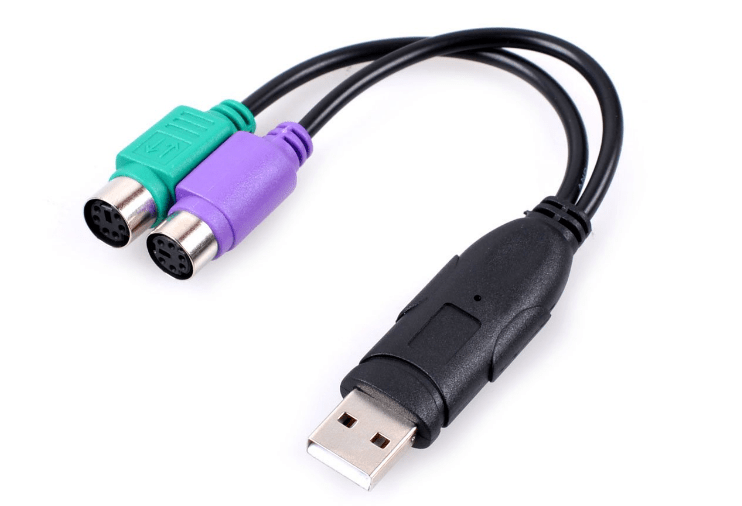
- 6-pin circular mini-DIN connector, typically color-coded:
- Purple port: For keyboards.
- Green port: For mice.
- 6-pin circular mini-DIN connector, typically color-coded:
- Pin Functionality:
- Includes pins for +5V power, ground, clock signal, and data transmission, enabling serial communication between the device and the computer.
3. Working Principle and Communication
- Serial Communication:
PS/2 uses a bidirectional serial protocol where devices (keyboard/mouse) send data to the host via clock and data lines. - Key Limitations:
- No hot-plugging: Devices must be connected before powering on the computer to avoid damage.
- Low data rate: Transfers at ~10–100 Kbps, sufficient for low-bandwidth input devices but obsolete for high-speed peripherals.
4. Comparison with Modern Interfaces
| Interface | PS/2 | USB | Wireless (e.g., Bluetooth) |
|---|---|---|---|
| Hot-Plug | Not supported | Supported | Supported (with pairing) |
| Data Speed | 10–100 Kbps | Up to 10 Gbps (USB 3.2) | Up to 2 Mbps (Bluetooth 5.0) |
| Compatibility | Requires motherboard support | Universal | Requires device/receiver |
| Use Cases | Legacy systems, industrial | Mainstream devices | Cordless peripherals |
5. Current Applications and Relevance
- Niche Uses Today:
- Industrial computers: Retained in some industrial setups for stability.
- Mechanical keyboards: Enthusiasts prefer PS/2 for “full-key rollover” (no ghosting), a feature limited in USB without drivers.
- Servers/legacy hardware: Some servers still include PS/2 ports for compatibility with old peripherals.
- Advantages:
- Reliability: Less prone to electromagnetic interference than early AT ports.
- Plug-and-play: No drivers needed, making it ideal for low-maintenance systems.
6. Connection Tips and Troubleshooting
- Installation Note:
Ensure keyboards and mice are plugged into their respective color-coded ports; refer to the motherboard manual if colors are absent. - Common Issues:
- No response: Check for loose connections or clean the port/cable pins.
- Driver conflicts: Rare in modern systems, but restarting or updating chipset drivers may resolve glitches.
7. Legacy and Modern Adaptation
While replaced by USB in consumer PCs, PS/2 persists in specialized roles due to its low latency (for keyboards) and simplicity. For the few who still use PS/2 devices on modern computers, PS/2 to USB adapters serve as a bridge, though full-key rollover functionality may be lost in the conversion.
Conclusion
PS/2 stands as a testament to IBM’s influence in standardizing computer interfaces, though its limitations (no hot-plug, slow speed) led to its decline in mainstream use. Today, it remains a niche solution for reliability-focused environments and 复古 computing enthusiasts, reminding us of the evolution from proprietary ports to universal connectivity standards like USB.





















Leave a comment