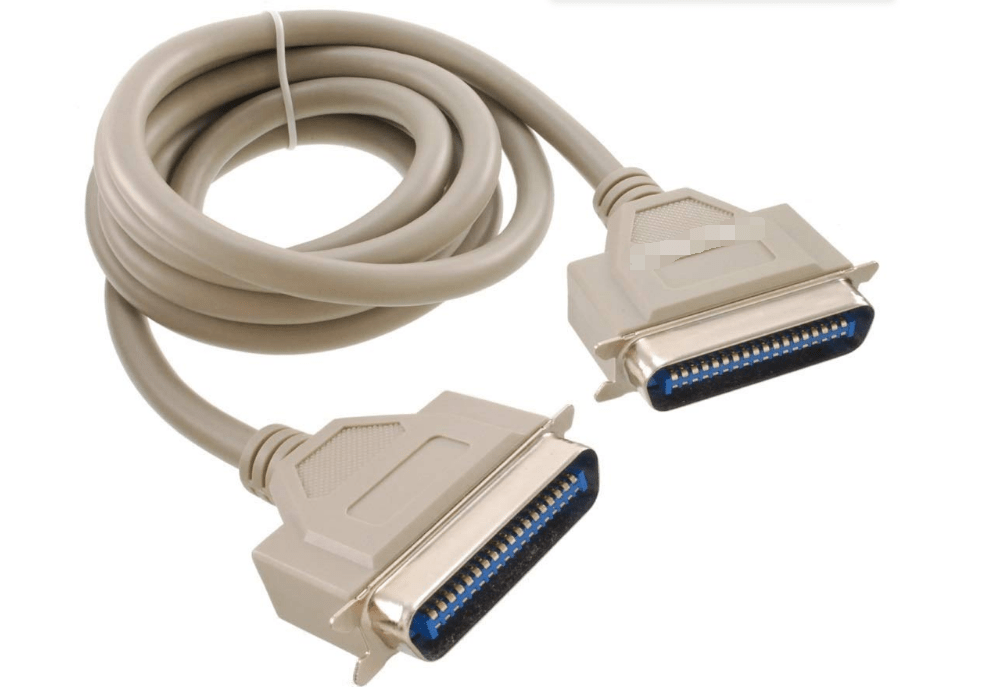
1. Definition and Origin
The Centronics Parallel 36-pin interface is a standardized parallel port developed by Centronics Data Computer Corporation in the early 1970s. It became the de facto standard for connecting printers and other peripherals to computers, prioritizing high-speed data transfer over serial connections of the era.
2. Physical Connector and Design
- 36-Pin Connector:
- A rectangular, female connector with 36 pins arranged in two rows (18 pins per row), often referred to as a “Centronics connector.”
- Typically found on the rear of printers, while computers used a DB-25 male connector (requiring a Centronics-to-DB-25 cable for connection).
- Cable Construction:
- Shielded cables to reduce electromagnetic interference, with a maximum recommended length of 3 meters for reliable data transfer.
3. Signal Definition and Functionality
- Data Lines:
- 8 bidirectional data lines (D0–D7) for transmitting 8-bit parallel data, enabling faster transfer than serial interfaces (e.g., RS-232).
- Control Signals:
- Strobe (Pin 1): Initiates data transfer from the computer to the printer.
- Acknowledge (Pin 10): Indicates the printer has received data.
- Busy (Pin 11): Signals the printer is unavailable (e.g., printing, out of paper).
- Status Signals:
- Paper Out (Pin 12), Error (Pin 13), and Select (Pin 14), providing feedback on printer status.
4. Transmission Modes (IEEE 1284 Standard)
The IEEE 1284 standard (1994) defined five operation modes for parallel ports, supporting bidirectional communication:
- Compatibility Mode (Normal Mode): Unidirectional, 400 Kbps, compatible with legacy printers.
- Nibble Mode: Transfers data in 4-bit chunks, enabling printer-to-computer feedback.
- Byte Mode: 8-bit bidirectional transfer at ~500 Kbps.
- Enhanced Parallel Port (EPP): Supports 2 Mbps, used for scanners and external storage.
- Extended Capability Port (ECP): 2.5 Mbps with data compression, ideal for high-speed printers.
5. Performance and Applications
- Data Transfer Speed:
- Up to 2.5 Mbps in ECP mode, significantly faster than serial ports (e.g., RS-232’s 56 Kbps).
- Primary Use Cases:
- Connecting inkjet/laser printers to computers (1980s–2000s).
- Legacy scanners, plotters, and external floppy drives.
- Industrial control systems requiring reliable parallel communication.
6. Comparison with Modern Interfaces
| Interface | Centronics Parallel | USB 2.0 | USB 3.0 |
|---|---|---|---|
| Max Speed | 2.5 Mbps (ECP) | 480 Mbps | 5 Gbps |
| Connector Type | 36-pin rectangular | Type-A/B/Micro-B | Type-A/C |
| Power Delivery | None | 500 mA @ 5V | 900 mA @ 5V |
| Bidirectional | Yes (with IEEE 1284) | Yes | Yes |
7. Limitations and Decline
- Cable Length Restrictions:
- Performance degraded over 3 meters, limiting installation flexibility.
- Lack of Plug-and-Play:
- Required manual configuration (IRQ, I/O address) in older systems, prone to conflicts.
- Obsoleteness:
- Replaced by USB (1996+) for its universal compatibility, hot-plugging, and higher speeds. Most modern printers no longer include Centronics ports.
8. Modern Relevance and Adaptation
- Legacy Equipment:
- Still used in some industrial printers, vintage computers, and musical instruments (e.g., older synthesizers with MIDI-over-parallel).
- Adapters and Bridges:
- USB-to-Centronics adapters exist for connecting old printers to modern computers, though speed is limited to USB 2.0 rates.
- Retro Computing:
- Enthusiasts restoring classic PCs (e.g., IBM PC XT/AT) often retain Centronics ports for authenticity.
9. Technical Legacy
- Parallel Communication Standard:
- Pioneered high-speed parallel data transfer, influencing the development of IEEE 1284 and parallel SCSI interfaces.
- Printer Connectivity Foundation:
- Laid the groundwork for modern printer interfaces, even as technology shifted to serial protocols like USB.
Conclusion
The Centronics Parallel 36-pin interface was a groundbreaking technology for printer connectivity in the pre-USB era, enabling faster data transfer and standardization across devices. Though obsolete in mainstream computing, its legacy persists in industrial and vintage setups, symbolizing a pivotal phase in the evolution of computer peripherals from niche hardware to universal standards.





















Leave a comment