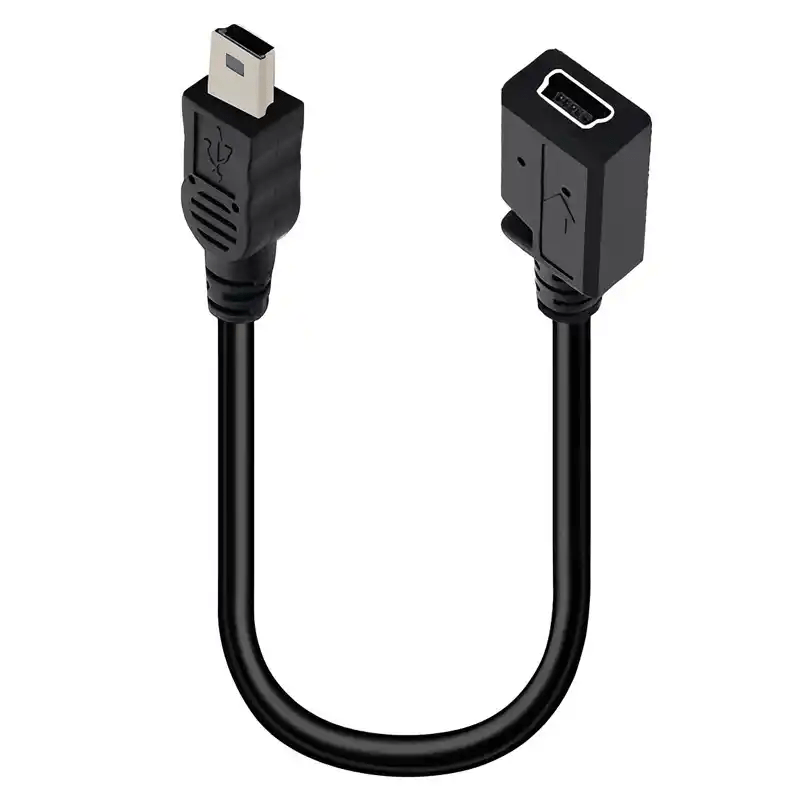
I. Basic Concept of USB Mini Interface
The USB Mini interface is an early miniaturized version of USB, introduced around 2000 to address the bulkiness of traditional Type-A/B interfaces for portable devices. Key features include:
- Compatibility: Supports USB 1.1 (up to 12 Mbps) and USB 2.0 (up to 480 Mbps), with charging capabilities in some models.
- Physical Design: Trapezoidal shape (narrower at the front, wider at the back) to prevent misinsertion, with a thickness of ~2.7 mm—significantly thinner than standard USB (4.5 mm).
II. Main Types and Differences of USB Mini Interfaces
1. USB Mini-A Interface
- Appearance: Trapezoidal plug with a flat top and wider base, measuring ~6.8 mm × 11.4 mm.
- Applications: Early use in digital cameras, MP3 players (e.g., some old iPod models) for data transfer and charging.
2. USB Mini-B Interface
- Appearance: Similar to Mini-A but with a raised “tab” on the top to avoid misinsertion into Mini-A sockets.
- Applications: The most common Mini type, widely used in mobile phones (e.g., Nokia N series), external hard drives, GPS devices, etc.
- Variants:
- Mini-B 5pin: Standard version with 5 pins (power, data±, ground, ID pin) for hot-swapping.
- Mini-B 4pin: Omits the ID pin, used for charging or basic data transfer in low-end devices.
3. USB Mini-AB Interface
- Function: Compatible with both Mini-A and Mini-B plugs, allowing the socket to act as a host or device interface.
- Applications: Rarely seen, mainly in devices requiring flexible role switching (e.g., early USB hubs).
III. Technical Specifications of USB Mini Interface
- Pin Definition (Mini-B 5pin)
- Pin 1 (VCC): +5V power supply.
- Pin 2 (Data-): Negative data signal.
- Pin 3 (Data+): Positive data signal.
- Pin 4 (GND): Ground.
- Pin 5 (ID): Identifies device role (host/slave) for OTG functionality.
- Transmission and Charging Capabilities
- Data Transfer: Up to 480 Mbps (USB 2.0), suitable for early mobile device data syncing.
- Charging Power: Max 5V/500mA (2.5W), ideal for small-capacity batteries but inefficient for modern devices.
IV. Application Scenarios and Historical Role
- Prime Period (2000–2010):
The mainstream interface for portable devices, used in:- Consumer Electronics: Nokia/Motorola phones, Sony PSP, Canon/Nikon cameras.
- Peripherals: External hard drives, old USB flash drives, sound/network cards.
- Medical/Industrial Devices: Small sensors, handheld detectors.
- Reasons for Obsolescence:
- Bulky Design: Thicker than subsequent Micro-USB (2.1 mm) and USB-C (1.8 mm).
- Non-Reversibility: Trapezoidal shape still required direction identification, less convenient than USB-C.
- Limited Performance: Could not support fast charging (e.g., PD) or high-speed data (USB 3.0+).
V. Transition to Modern Interfaces
- Current Status: Only found in legacy devices (e.g., old printers, industrial meters), obsolete in consumer electronics.
- Adapter Solutions: Connect Mini-equipped devices via Mini-B to USB-A cables or Mini-B to USB-C adapters.
VI. Conclusion
The USB Mini interface represents an early attempt to miniaturize USB, marking a milestone in portable device evolution. Though replaced by Micro-USB and USB-C, its design principles paved the way for subsequent interfaces. Today, it survives primarily in outdated equipment, reflecting the industry’s shift toward more compact, universal connectivity.





















Leave a comment