The USB bus operates as a master-slave bus. Within a single USB bus, only one device can function as the USB host, while all other devices act as slaves.
Prior to connecting two devices via the USB bus, their master-slave relationship is typically predetermined (except for OGT). For instance, the Downstreaming Face Port (DFP) generally serves as the host, while the Upstreaming Face Port (UFP) functions as the slave device. During the USB 2.0 and even USB 3.0 eras, most devices still utilized Type-A, Type-B, and similar interfaces. Visually, these interfaces made it straightforward to distinguish between host and slave devices.
However, starting with USB 3.1, all USB interfaces must use the Type-C connector. Since the device-side and host-side connectors are identical, Type-C cables are required for connection. This makes it difficult to visually distinguish between the host and the device.
Compared to the DFP (Device Face Plug) and UFP (Host Face Plug) roles defined in the original USB specification, the USB Type-C interface has expanded and redefined these roles. This expansion includes the introduction of the PD (Power Delivery) charging protocol and the ability to switch between host and device roles. For instance, under the USB specification, if a device’s interface is DFP, it must function as a host. If an interface is UFP, it must function as a device. However, under the Type-C specification, due to this redefinition of roles, an interface with DFP functionality may not necessarily support USB host communication. Similarly, an interface with only UFP functionality may not necessarily support USB device communication.
Type-C connectors are categorized into right-side-up sockets and reverse-insertion sockets. The cable connection configuration at each end differs depending on the insertion orientation.
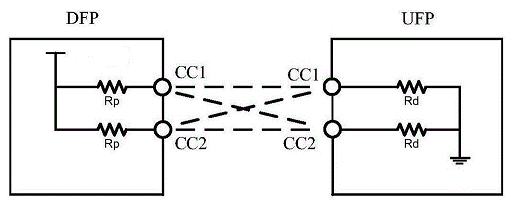
The Type-C specification defines additional role types compared to the USB specification, as follows:
Pure Power Source: Operates exclusively as a power source (Source) and cannot switch to power sink (Sink) mode via the power supply protocol.
Default Power Source: Operates as a power source by default but can switch to power sink mode via the power supply protocol.
Pure Sink: Operates only as a power sink and cannot switch to power supply mode via the power protocol.
Default Sink: Operates as a power sink by default but can switch to power supply mode via the power protocol.
Dual Role: Operates as a dual role (DRP) by default and can switch power supply roles via the power protocol.
Dual-Role Power-Supplying Device: Operates as dual-role by default, can switch power supply role via power supply protocol. Supports DFP and UFP functions but cannot function as a USB host, e.g., the upstream port (UFP) of a hub.
Dual-Role Power-Consuming Host: Operates by default as a dual-role device, capable of switching power roles via the power delivery protocol. Supports DFP and UFP functions but cannot function as a USB device (detico), such as a hub’s downstream port (DFP).
From a power delivery perspective, a Type-C interface can be a power source (Source), a power sink (Sink), or a dual-role device (DRP). From a communication perspective, a Type-C interface can be a Downstream Port (DFP), an Upstream Port (UFP), or a Dual Role Port. The functional role is determined at connection based on the power role: when the power role is Source, the functional role defaults to DFP; when the power role is Sink, the functional role defaults to UFP.
From a power supply perspective, an interface can be a power source (Source), a power sink (Sink), or a dual role (DRP).
From a communication function perspective, an interface can be a downstream port (DFP), an upstream port (UFP), or a dual role.
The functional role is determined at connection time based on the power role. When the power role is Source, the functional role defaults to DFP; when the power role is Sink, the functional role defaults to UFP.
The role of a Type-C device is typically pre-determined at the factory. Whether two Type-C devices can function when connected depends on their roles.
“Non-functional” means that after connection, neither device can identify the other, power delivery does not occur, and normal operation is impossible; however, this does not cause device damage.
“Functional” means that after interconnection, both devices can identify each other and perform power delivery and communication.
As shown in the table above, a power-supplying device cannot connect and function with another power-supplying device, nor can a power-consuming device connect and function with another power-consuming device. A dual-role device can connect with any type of device: when connected to a power-supplying device, it functions as a power-consuming device; when connected to a power-consuming device, it functions as a power-supplying device. When connected to another dual-role device, it randomly functions as either a power-supplying or power-consuming device.
- iPhone 15 Pro Review: Ultimate Features and Specs
- iPhone 15 Pro Max: Key Features and Specifications
- iPhone 16: Features, Specs, and Innovations
- iPhone 16 Plus: Key Features & Specs
- iPhone 16 Pro: Premium Features & Specs Explained
- iPhone 16 Pro Max: Features & Innovations Explained
- iPhone 17 Pro: Features and Innovations Explained
- iPhone 17 Review: Features, Specs, and Innovations
- iPhone Air Concept: Mid-Range Power & Portability
- iPhone 13 Pro Max Review: Features, Specs & Performance
- iPhone SE Review: Budget Performance Unpacked
- iPhone 14 Review: Key Features and Upgrades
- Apple iPhone 14 Plus: The Ultimate Mid-range 5G Smartphone
- iPhone 14 Pro: Key Features and Innovations Explained
- Why the iPhone 14 Pro Max Redefines Smartphone Technology
- iPhone 15 Review: Key Features and Specs
- iPhone 15 Plus: Key Features and Specs Explained
- iPhone 12 Mini Review: Compact Powerhouse Unleashed
- iPhone 12: Key Features and Specs Unveiled
- iPhone 12 Pro: Premium Features and 5G Connectivity
- Why the iPhone 12 Pro Max is a Top Choice in 2023
- iPhone 13 Mini: Compact Powerhouse in Your Hand
- iPhone 13: Key Features and Specs Overview
- iPhone 13 Pro Review: Features and Specifications





















 Ruigu Electronic
Leave a comment