The USB protocol defines four core transfer modes (Control Transfers, Isochronous Transfers, Interrupt Transfers, and Bulk Transfers). Each mode is designed for specific application scenarios and differs significantly in transmission characteristics, reliability, and bandwidth allocation. Below is a comparison of their characteristics and the basis for selecting each mode:
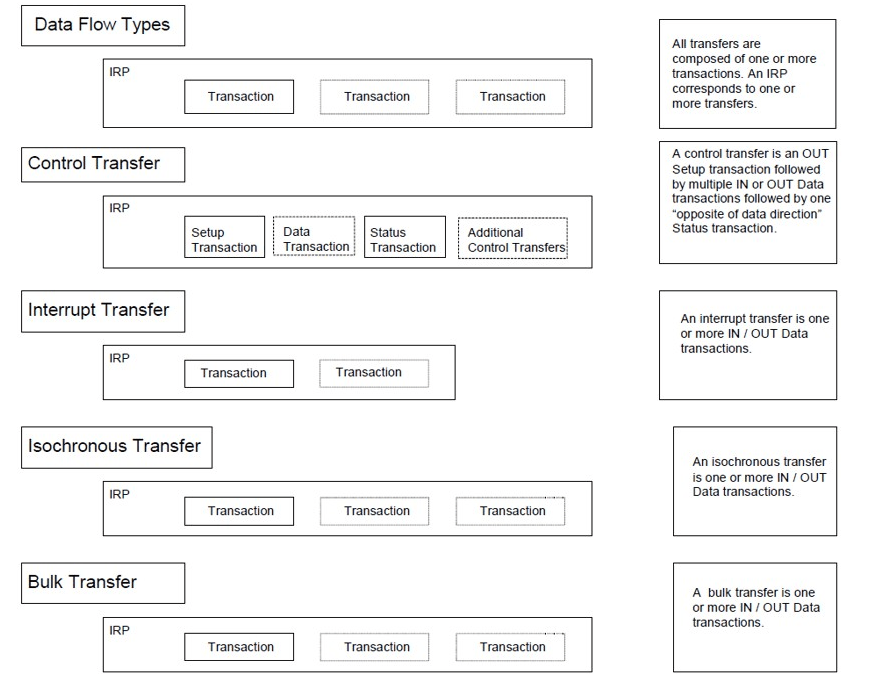
I. Basis for Selecting Transfer Modes
The core principle for choosing a USB transfer mode is to match the device’s data transmission requirements, considering the following factors:
- Data real-time performance: Whether fixed-interval transmission is required (e.g., audio/video).
- Reliability: Whether data loss is acceptable (and whether retransmission is needed if lost).
- Data volume: Whether it involves small, frequent transfers (e.g., mouse commands) or large, bursty transfers (e.g., file copying).
- Bandwidth demand: Whether fixed bandwidth is required to ensure smooth transmission.
II. Characteristic Comparison of the Four Transfer Modes
| Characteristic | Control Transfers | Isochronous Transfers | Interrupt Transfers | Bulk Transfers |
|---|---|---|---|---|
| Core Purpose | Device initialization and configuration management (e.g., enumeration, command interaction) | Real-time data streams (e.g., audio, video, VoIP) | Low-latency, small-batch periodic data (e.g., keyboards, mice, game controllers, sensors) | Large-volume non-real-time data (e.g., file transfers, printers, scanners, external hard drives) |
| Data Volume | Small (usually byte-level, relying on Endpoint 0) | Medium to large (depending on real-time needs, e.g., 1024 bytes per frame) | Small (typically ≤1024 bytes per transfer) | Large (up to 512/1024 bytes per transfer; total data volume unlimited) |
| Real-Time Performance | Low (no fixed interval, triggered on demand) | High (strictly periodic, e.g., every 125µs/1ms) | Medium (periodic based on configurable polling intervals, e.g., 10ms/1ms) | Low (no fixed timing, relies on bus idle time) |
| Reliability | High (supports retransmission to ensure correct reception) | Low (no retransmission; data loss is allowed to prioritize real-time performance) | High (supports retransmission to ensure data integrity) | High (supports retransmission until data is correctly received) |
| Bandwidth Allocation | Lowest priority; minimal bandwidth usage (only when necessary) | Highest priority; pre-allocated fixed bandwidth (up to 80% of total bus bandwidth) | Medium priority; fixed bandwidth allocated based on polling intervals | Lowest priority; uses only remaining bus bandwidth (no fixed allocation; waits when the bus is busy) |
| Error Handling | Retransmits on error until successful | No retransmission; corrupted data is discarded (relies on upper-layer fault tolerance, e.g., audio noise reduction for packet loss) | Retransmits on error until success or timeout | Retransmits on error until success (no timeout limit, ensuring data integrity) |
| Supported Speed Modes | Low-Speed (LS), Full-Speed (FS), High-Speed (HS) | Not supported by LS; supported by FS and HS | Supported by LS, FS, and HS | Not supported by LS; supported by FS and HS |
| Typical Devices | All USB devices (mandatory Endpoint 0 for initialization) | Cameras, microphones, speakers, video capture cards | Keyboards, mice, game controllers, touchscreens, sensors | USB flash drives, external hard drives, printers, scanners |
| USB Version Differences | Supported by USB 1.1/2.0/3.x with consistent features | Lower bandwidth in USB 1.1/2.0 (e.g., 1024 bytes/microframe for USB 2.0 HS); extended to “isochronous streams” in USB 3.x with significantly higher bandwidth | Smaller transfer sizes in USB 1.1/2.0 (e.g., ≤1024 bytes for USB 2.0 HS); supports larger packets and faster speeds in USB 3.x | Limited speed in USB 1.1/2.0 (e.g., 512 bytes/packet for USB 2.0 HS); “SuperSpeed Bulk” in USB 3.x offers 10x faster speeds |
III. Summary
- Control Transfers are a “fundamental function” for all USB devices, used for initial communication between the device and host, requiring no manual selection.
- Isochronous Transfers are ideal for real-time media devices, sacrificing reliability for smoothness.
- Interrupt Transfers suit small-data devices needing quick responses, balancing real-time performance and reliability.
- Bulk Transfers are preferred for large-volume data, ensuring integrity at the cost of waiting for bus idle time.
In practice, a single device may use multiple transfer modes (e.g., a printer with a camera: isochronous transfers for the camera, bulk transfers for print data, and control transfers for device management) to meet diverse needs.





















 Ruigu Electronic
Leave a comment