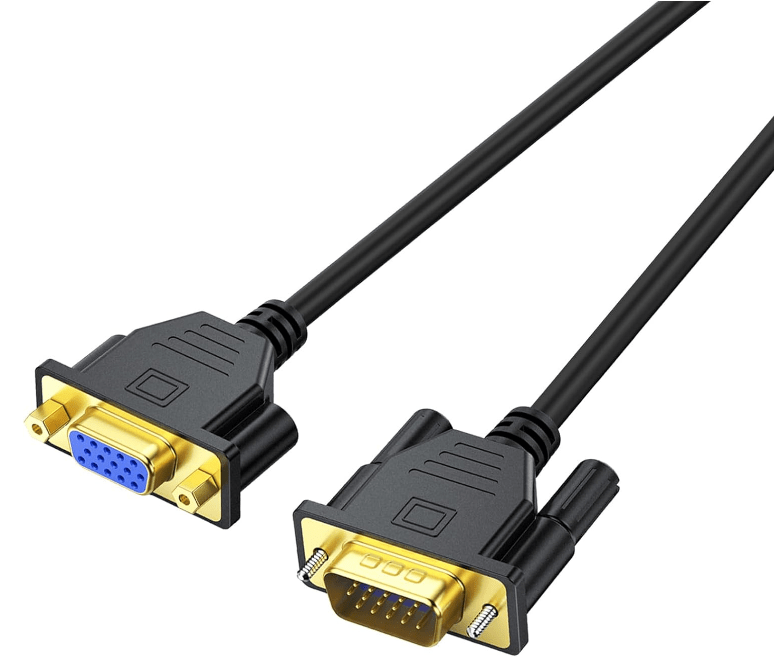
VGA (Video Graphics Array), often referred to by its 15-pin connector, is a classic analog video interface that dominated display connectivity for decades. Introduced by IBM in 1987, it became the standard for connecting computers to monitors, projectors, and TVs, remaining in use well into the 2010s despite the rise of digital interfaces.
1. Core Design: 15-Pin DE-15 Connector
- Physical Structure: The VGA interface uses a 15-pin DE-15 connector—a D-subminiature plug with 15 pins arranged in three rows (5 pins per row). It is typically blue (though color can vary) to distinguish it from other D-sub connectors (e.g., serial or parallel ports).
- Pin Functions: The 15 pins transmit analog video signals, including:
- Red, Green, Blue (RGB): Three pins carry separate analog signals for the primary colors, which combine to form all visible colors.
- Horizontal Sync (HSync) and Vertical Sync (VSync): Two pins control timing, ensuring the display refreshes correctly to align with the source signal.
- Ground Pins: The remaining pins act as ground connections for the RGB and sync signals, reducing interference.
2. Signal Transmission and Resolution
- Analog Nature: VGA transmits video as continuous electrical voltage (0–0.7 V) representing color intensity, unlike digital interfaces (HDMI, DisplayPort) that send binary data. This makes it susceptible to signal degradation over long distances or through poor-quality cables.
- Resolution Limits:
- Standard resolutions supported include 640×480 (VGA), 800×600 (SVGA), 1024×768 (XGA), and 1280×1024 (SXGA).
- Maximum practical resolution is around 1920×1080 (1080p) at 60 Hz, though image quality degrades significantly at this range due to analog signal loss.
- Refresh Rates: Typically 60–85 Hz for standard resolutions; higher rates reduce flicker but require stronger signals.
3. Applications and History
- Golden Age (1990s–2000s): VGA was ubiquitous in:
- Desktop computers, laptops, and CRT monitors.
- Projectors in classrooms, offices, and conference rooms.
- Early LCD TVs and gaming consoles (e.g., PlayStation 2, Xbox).
- Legacy Use Today:
- Older industrial equipment, ATMs, and point-of-sale systems with long lifecycles.
- Retro computing and gaming setups (e.g., connecting vintage PCs or consoles to CRT monitors).
- Budget projectors or displays in regions with limited access to digital hardware.
4. Advantages and Limitations
- Advantages:
- Universality: Supported by nearly all analog displays and legacy devices, ensuring backward compatibility.
- Simplicity: No complex digital encoding/decoding—works with basic cables and adapters.
- Cost-Effective: VGA cables and adapters are inexpensive to produce.
- Limitations:
- Analog Signal Loss: Susceptible to noise, interference, and degradation over distances >5 meters, leading to blurry images or color distortion.
- No Audio Support: Transmits only video; audio requires separate cables (e.g., 3.5mm jacks).
- Low Resolution: Cannot support modern high-definition (4K) or ultra-high-definition (8K) displays.
- Obsolete for New Hardware: Phased out in laptops, GPUs, and TVs after 2010, replaced by HDMI and DisplayPort.
5. Adapters and Compatibility
To connect VGA devices to modern digital interfaces, adapters are required:
- VGA to HDMI/DisplayPort Adapters: These active adapters convert analog VGA signals to digital, often including a 3.5mm audio input to combine video and audio over the digital cable.
- HDMI/DisplayPort to VGA Adapters: Allow modern sources (e.g., laptops, streaming devices) to connect to legacy VGA displays.
6. Comparison to Digital Interfaces
| Feature | VGA (15-pin) | HDMI | DisplayPort |
|---|---|---|---|
| Signal Type | Analog (RGB + sync) | Digital (video + audio) | Digital (video + audio) |
| Max Resolution | ~1920×1080 (1080p) at 60 Hz | Up to 10K (HDMI 2.1) | Up to 16K (DisplayPort 2.1) |
| Audio Support | None | Yes (multi-channel) | Yes (multi-channel) |
| Interference | High (analog signal loss) | Low (digital, error-corrected) | Low (digital, error-corrected) |
Conclusion
The 15-pin VGA interface was a cornerstone of analog video technology, enabling visual computing for over three decades. While its analog limitations make it obsolete for modern high-definition setups, its universal compatibility and simplicity ensure it remains functional in legacy systems. VGA’s legacy highlights the transition from analog to digital display technology, paving the way for the high-performance interfaces we use today.





















 Ruigu Electronic
Leave a comment