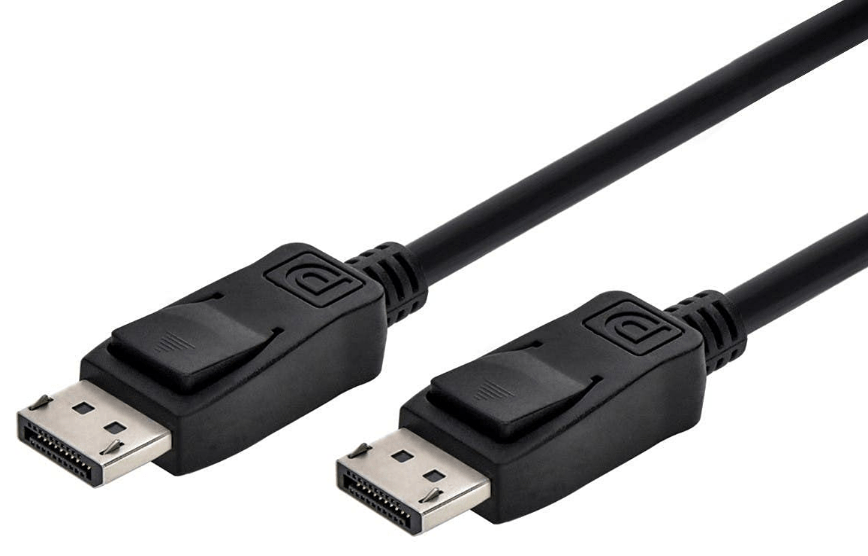
DisplayPort is a high-performance digital audio/video interface developed by the Video Electronics Standards Association (VESA). Introduced in 2006, it was designed to replace older standards like DVI and VGA, offering enhanced bandwidth, versatility, and support for modern display technologies. It has since become a widely adopted standard in computing, gaming, and professional audio-visual setups. Below is a detailed overview:
1. Key Features and Advantages
- High Bandwidth: DisplayPort supports significant data transfer rates, enabling high-resolution video and audio. The latest version, DisplayPort 2.1, offers a maximum bandwidth of 80 Gbps (using Ultra High Bit Rate 3, or UHBR3), supporting resolutions up to 16K (15360×8640) at 60 Hz, or 8K (7680×4320) at 120 Hz with HDR.
- Audio-Video Integration: Unlike DVI or VGA, DisplayPort transmits both uncompressed digital video and multi-channel audio (up to 32 channels at 1536 kHz) over a single cable, simplifying setups.
- Multi-Display Support: Through technologies like Multi-Stream Transport (MST), DisplayPort allows daisy-chaining multiple displays from a single port (e.g., connecting three 4K monitors in a sequence).
- HDR and Adaptive Sync: It supports High Dynamic Range (HDR) for richer colors and contrast, as well as adaptive sync technologies (e.g., AMD FreeSync, VESA Adaptive-Sync) to reduce screen tearing in gaming.
- Backward Compatibility: With adapters, DisplayPort can connect to older interfaces like HDMI, DVI, and VGA, making it versatile for legacy devices.
2. Versions and Evolution
DisplayPort has evolved through several versions, each improving bandwidth and capabilities:
| Version | Release Year | Max Bandwidth (per lane) | Key Improvements |
|---|---|---|---|
| DisplayPort 1.0 | 2006 | 2.75 Gbps | Initial release; supports up to 2560×1600 at 60 Hz. |
| DisplayPort 1.2 | 2009 | 5.4 Gbps | Introduces MST, 4K (3840×2160) at 60 Hz, and audio enhancements. |
| DisplayPort 1.4 | 2016 | 8.1 Gbps | Adds HDR10 support, 8K (7680×4320) at 30 Hz, and Display Stream Compression (DSC). |
| DisplayPort 2.0 | 2019 | 16.2 Gbps (UHBR20) | Supports 16K at 60 Hz, 8K at 120 Hz, and increased bandwidth for multiple displays. |
| DisplayPort 2.1 | 2022 | 20 Gbps (UHBR30) | Enhances DSC efficiency, improves gaming performance, and simplifies cable requirements. |
3. Connector Types
DisplayPort uses several connector form factors to suit different devices:
- Standard DisplayPort: The full-sized connector, common on desktop GPUs, monitors, and professional equipment.
- Mini DisplayPort: A smaller variant, popular in laptops, tablets, and older Apple devices (e.g., MacBook Pro). It is electrically identical to standard DisplayPort.
- USB-C with DisplayPort Alt Mode: Many modern devices use USB-C ports that support DisplayPort signals via an “alternate mode,” eliminating the need for a dedicated DisplayPort connector. This allows a single USB-C cable to handle video, audio, data, and power.
4. Use Cases
- Computing: Found on laptops, desktops, and graphics cards for connecting monitors, docks, or external displays.
- Gaming: Preferred by many gamers for its high refresh rate support (e.g., 4K at 144 Hz) and adaptive sync compatibility.
- Professional AV: Used in studios, conference rooms, and digital signage for high-resolution multi-display setups.
- Consumer Electronics: Some TVs, projectors, and streaming devices include DisplayPort for high-fidelity video output.
5. Comparison to HDMI
While both are popular, DisplayPort and HDMI differ in key areas:
| Feature | DisplayPort | HDMI |
|---|---|---|
| Bandwidth (Latest) | 80 Gbps (2.1) | 48 Gbps (2.1) |
| Multi-Display Support | Native MST for daisy-chaining | Requires splitters (limited by version). |
| Adaptive Sync | VESA Adaptive-Sync (wider support) | HDMI Variable Refresh Rate (VRR) |
| Connector Options | Standard, Mini, USB-C Alt Mode | Standard, Mini, Micro |
| Common in | PCs, gaming GPUs, professional gear | TVs, consoles, home entertainment |
Summary
DisplayPort is a robust, future-proof interface that excels in high-performance scenarios, from gaming to professional workflows. Its high bandwidth, multi-display support, and compatibility with USB-C make it a preferred choice for modern devices. As display technologies advance (e.g., higher resolutions, faster refresh rates), DisplayPort continues to adapt, solidifying its role as a leading standard in digital connectivity.






















 Ruigu Electronic
Leave a comment